 KODO
KODOSeveral vessels, one screen, worst first.
For a management company the question each morning is which boat needs a person today. KODO's oversight surface answers it in one sentence and puts that boat at the top. The captain runs the vessel in the crew app; you see health, money, compliance and the decisions that need you, without the crew's daily noise.
What the dashboard exposes
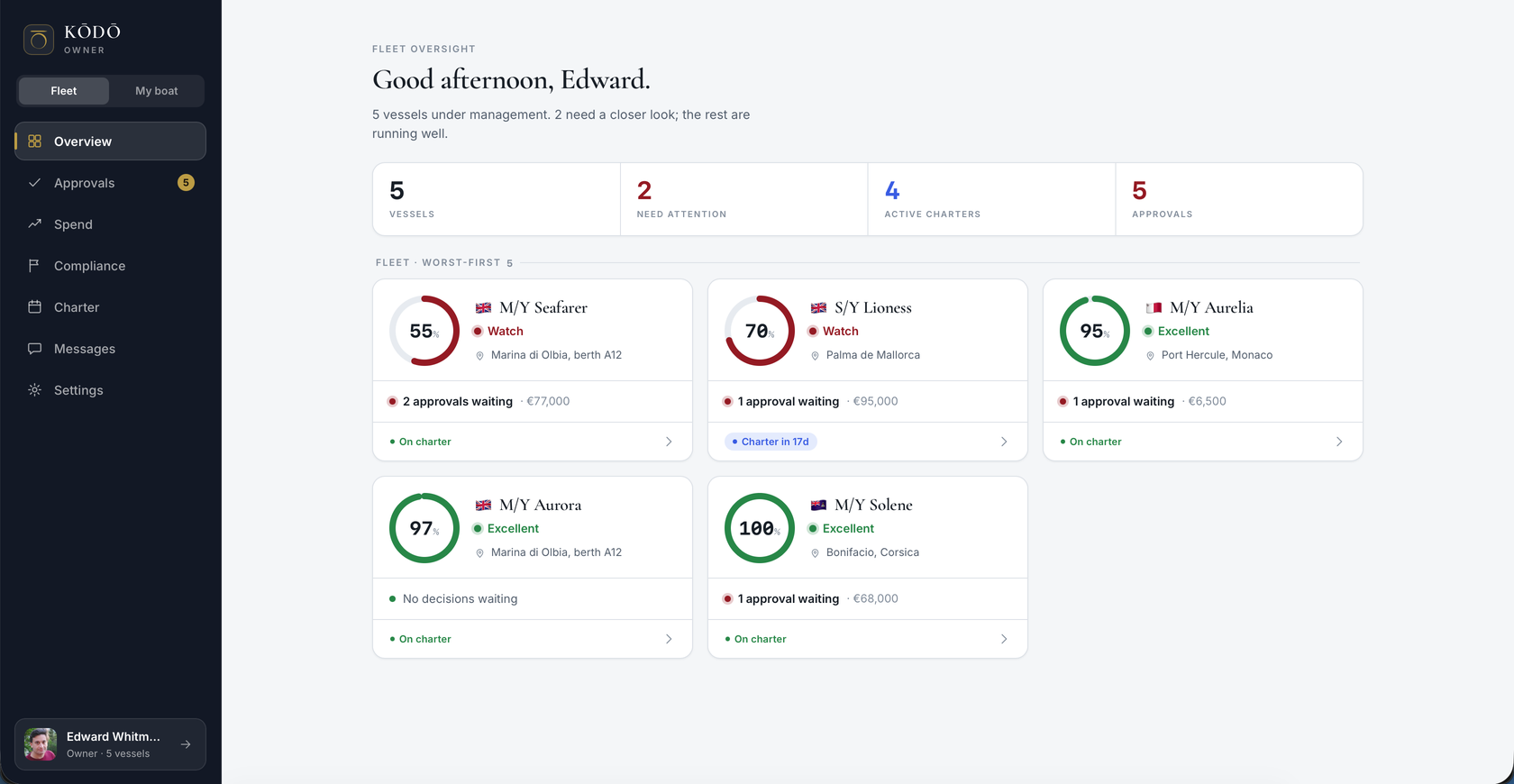
A plain-English fleet line, such as three vessels under management, one needs a closer look, the rest are running well. Under it: vessels, need attention, active charters, approvals.
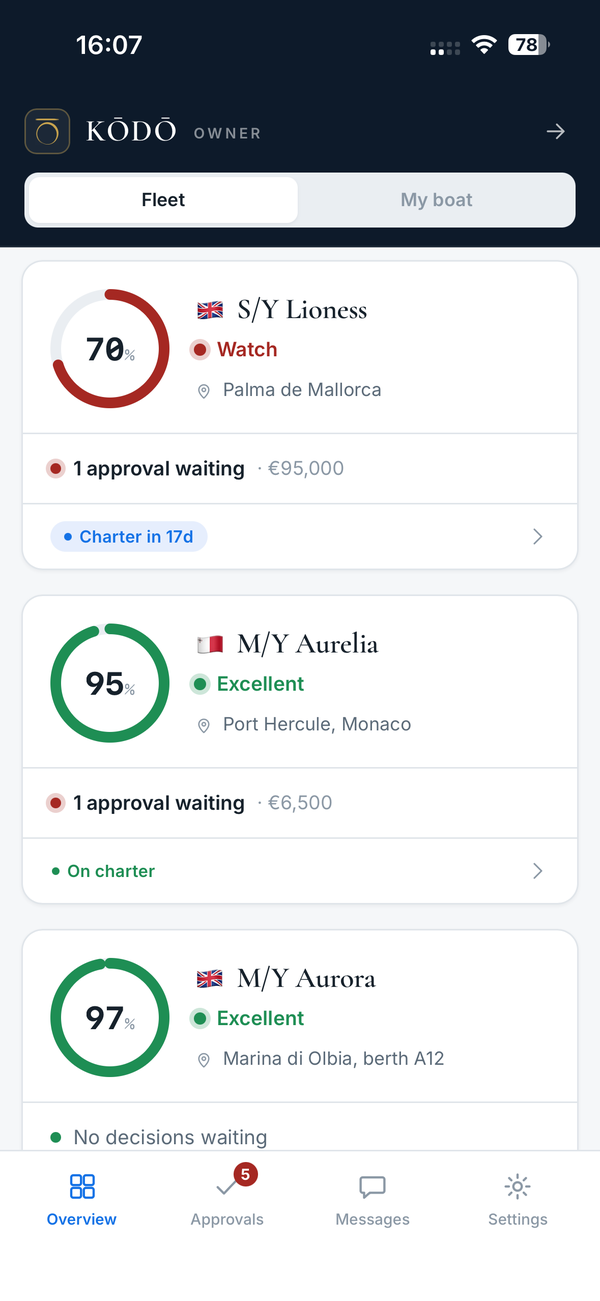
A readiness radial with a state word, the last known location, an escalations line such as two approvals waiting and the amount, and a charter pill. The readiness score is the same composite the captain sees, so there is one number, not two.
Each pin shows the freshest of the ship's log and live AIS (AIS only for boats with an MMSI), colour-coded by recency. The map says it shows last reported positions, not a live feed.
One A4 page per vessel for any of the last three months: spend against budget, charter days, incidents, drills and rest-hour violation days, then money by category, operations and safety, compliance and stores. Built entirely from the vessel's own records.
Tap a boat for its readiness, where she is with the source and age of the position, and four signals: approvals pending, charter status, certificates expired or due within 60 days, and spend as a share of the annual budget. Then the decisions waiting on you.
How approvals and problems reach you
One queue across the whole fleet, one card at a time, urgency first. Each card carries the category, the vessel, the captain's estimate, a meter showing it as a share of that boat's annual budget, and the captain's note. Approve, Decline, or Ask, which opens a message to that captain.
Every certificate, survey, class item, flag inspection and insurance policy across the fleet, soonest to lapse first. Captains and officers add and renew; the manager reads, and can message the captain from a lapsing certificate. A safety strip shows risk-assessment reviews overdue and days since each boat's last safety meeting. If the register cannot be read it shows an error, never an empty board.
Annual budget, committed this year, open approvals and remaining, for the fleet and per boat. Category breakdown, the full ledger, and crew-captured receipt photos. If the accountant already uses Voly, export it and drop the CSV in. KODO reads from Voly and never writes back.
Which boats are on charter now, what is confirmed ahead, and when each is next free. Oversight, not a booking tool. Any charter opens as a read-only brief with the broker and the notes they chose to share.
A request from the office lands in the captain's inbox, tagged as requested by the owner, so the office can push a wish down without bypassing the person running the boat. Messages are a single direct line to each captain, deliberately without group chats.
The oversight surface is read-only in code. A manager can decide approvals, message the captain and file a request. A manager cannot edit tasks, sign log entries, add or renew certificates, or invite and manage crew. That is the captain's job, and keeping it there is what makes the record trustworthy. In the crew app, the manager role can open the crew directory, the training matrix and the vessel history report.
Separated per vessel, in the database
- Row-level security on every table. Each vessel's information is scoped to that vessel inside the database itself
- The Brain answers from one yacht's record and nothing else
- A manager with several boats gets a vessel picker and sees only the vessels they have been given access to
- Crew passports and visas sit in an encrypted vault, readable only by the captain or officer of the boat the person is currently on, for port clearance
- Guests never appear in the vessel history report; crew appear as roles only
- Signed log entries, the statutory books, signed rest-hour months and signed safety-meeting minutes are locked by a database trigger
- Corrections are append-only with a stated reason and a named signer
- A complete export of any vessel's record is one action away, at no charge
- Data residency is AWS us-west-2, encrypted in transit and at rest
- Subprocessors are published on the security page; a data processing agreement is available on request
- Fleet Intelligence, which lets anonymised patterns contribute to benchmarks, is a per-vessel setting the captain can switch off
What bringing a boat on really involves
The captain invites the crew, by department, with a permission level, and temporary crew with an automatic expiry. Unlimited crew accounts are included, so there is no reason to ration seats. A system only one officer uses dies when that officer rotates off.
A new boat does not start empty. Ten standard yacht risk assessments are seeded, from tender ops and bunkering to hot work and enclosed space. Operations come from a template library. Tender safety checks seed on first open. A captain can apply a playbook starter pack: Med Charter Season, Private Owner Light Use or Yard Period Prep.
Manuals, procedures and the SMS go into the Brain as PDFs and become answerable with citations. A procedure PDF can have its tasks extracted into recurring tasks. Controlled documents get a revision label and a read-acknowledgement count.
Spend can be real within minutes by importing the accountant's Voly or accounting export as a CSV, with a confirmed column mapping and one-tap undo. Unparseable rows are skipped and counted, never inserted as zeros.
There is no self-serve importer for another maintenance or compliance system. Migration is done with you as part of setup: send what exists, spreadsheets, PMS exports, PDFs, binders, and we bring it across. Prior sea service is added per crew member with a supporting document. Anything backfilled into the vessel record is marked as backfilled in the history report rather than presented as logged at the time.
Work that can't wait continues on the device and syncs when the connection returns, and everything from the last sync stays readable. Full offline access to every screen is still being built.
Everything on this page is in the product today. Anything not described here should be treated as not built. If you need a fleet-level feature you do not see, ask and you will get a straight answer from the founder.
For the crew side, the maintenance workflow follows one defect from a phone to a verified close-out, and crew handover shows what an incoming captain inherits. The SMS audit checklist is a 20-minute self-audit for any boat in the fleet.
Asked by management companies
How is KODO priced across a fleet?
€1,000 per vessel per month, including every available module and unlimited crew accounts. That is the Founding Fleet rate for the first ten vessels, held for the life of the account. There are no per-user fees, so there is no reason to ration seats on a boat. There is no free tier and no free trial.
Can we get a data processing agreement and see where the data is held?
Yes. A data processing agreement is available on request. Data residency is AWS us-west-2, everything is encrypted in transit and at rest, and subprocessors are published on the security page rather than buried. A vessel's record is never used to train an AI model and never feeds another vessel's assistant.
Can we import records from the system a boat uses today?
The one bulk import today is the expense CSV, which reads a Voly or accounting-system export with a confirmed column mapping and one-tap undo. There is no self-serve importer for another maintenance or compliance system. Migration is done with you as part of setup: send what exists, spreadsheets, PMS exports, PDFs, binders, and we bring it across. Manuals and procedures are uploaded to the Brain as PDFs, prior sea service is added per crew member with a supporting document, and anything backfilled into the vessel record is marked as backfilled rather than presented as logged at the time.
See the fleet view on a live demo fleet
Thirty minutes: the fleet overview, the approvals queue and the monthly report on a demonstration fleet, then a straight answer about whether it fits how you run your boats.
Book a 30-minute demo