 KODO
KODOThe handover the boat has already written.
When a captain, an engineer or a chief stew rotates off, the next person should not start from a document written in the last 48 hours. KODO keeps the record the crew built all season, so day one starts from the boat's own history, not from whoever happened to be leaving.
What the incoming person can recover
Six things a new crew member usually has to reconstruct from scratch. In KODO each one is already on a screen, created by the previous crew as a by-product of doing the job.
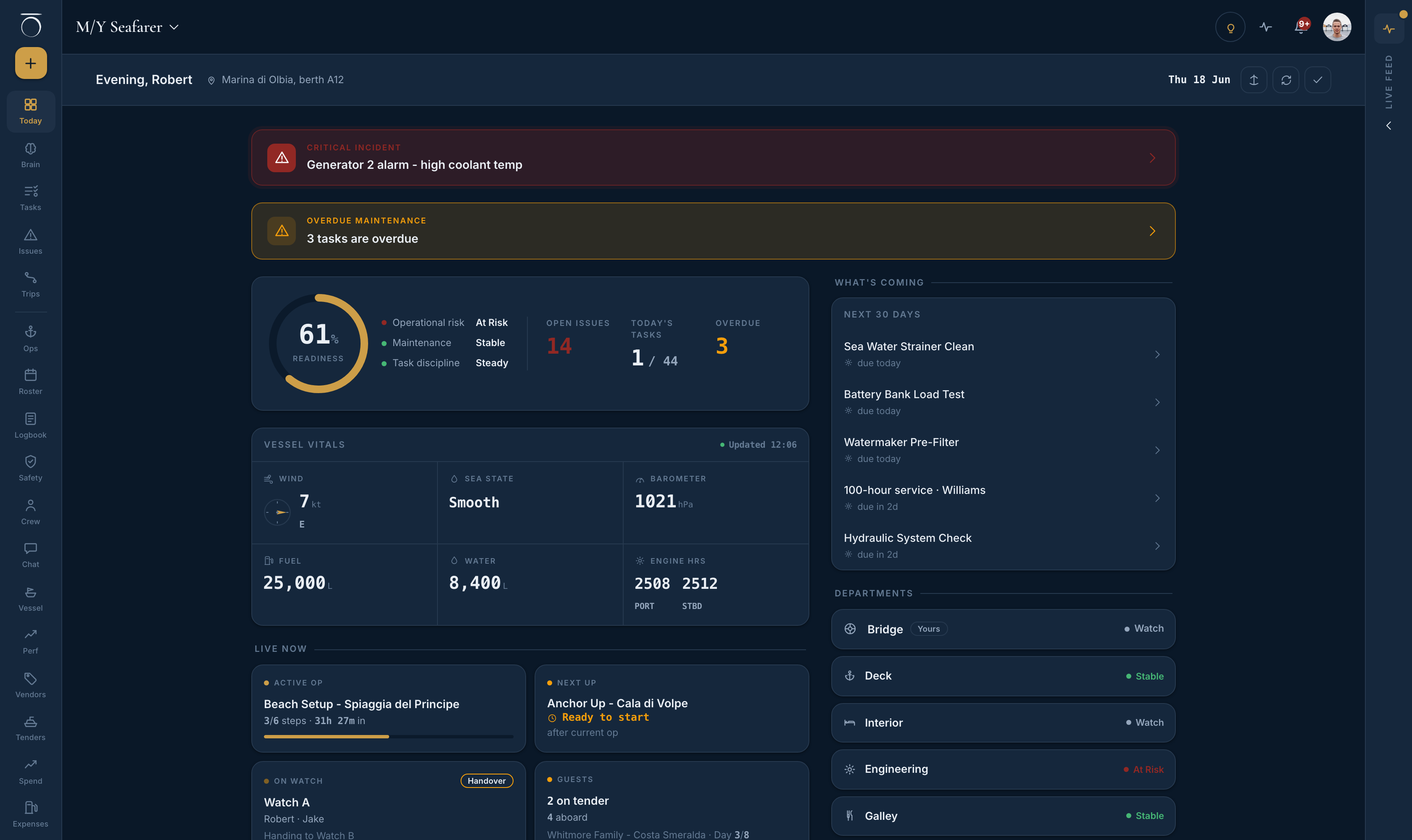
The crew home opens on a readiness score with its three parts (operational risk, maintenance, task discipline), the open problems, today's tasks, the overdue count, and a state word for each department. Vessel vitals come from the last logbook reading with live weather over the top.
Jobs that carry over stay on the task list as open jobs with an age badge. They never auto-expire. Deferred work carries the reason and the captain's decision on it.
Every defect, near-miss and observation sits in Issues with its lifecycle: submitted, under review, converted, resolved, rejected or escalated. Anything not closed out is still visible, with the photo taken when it was reported.
The logbook keeps signed entries and the sign-off queue. A signed entry is never edited. A correction is a new entry that references the original, with a stated reason and a named signer, so the incoming captain sees what was decided and what was later changed.
Manuals, procedures and safety documents uploaded to the Brain are searchable. A controlled document carries a revision label and a count of who has acknowledged reading it. The vendor book shows which contractor did which job on which system.
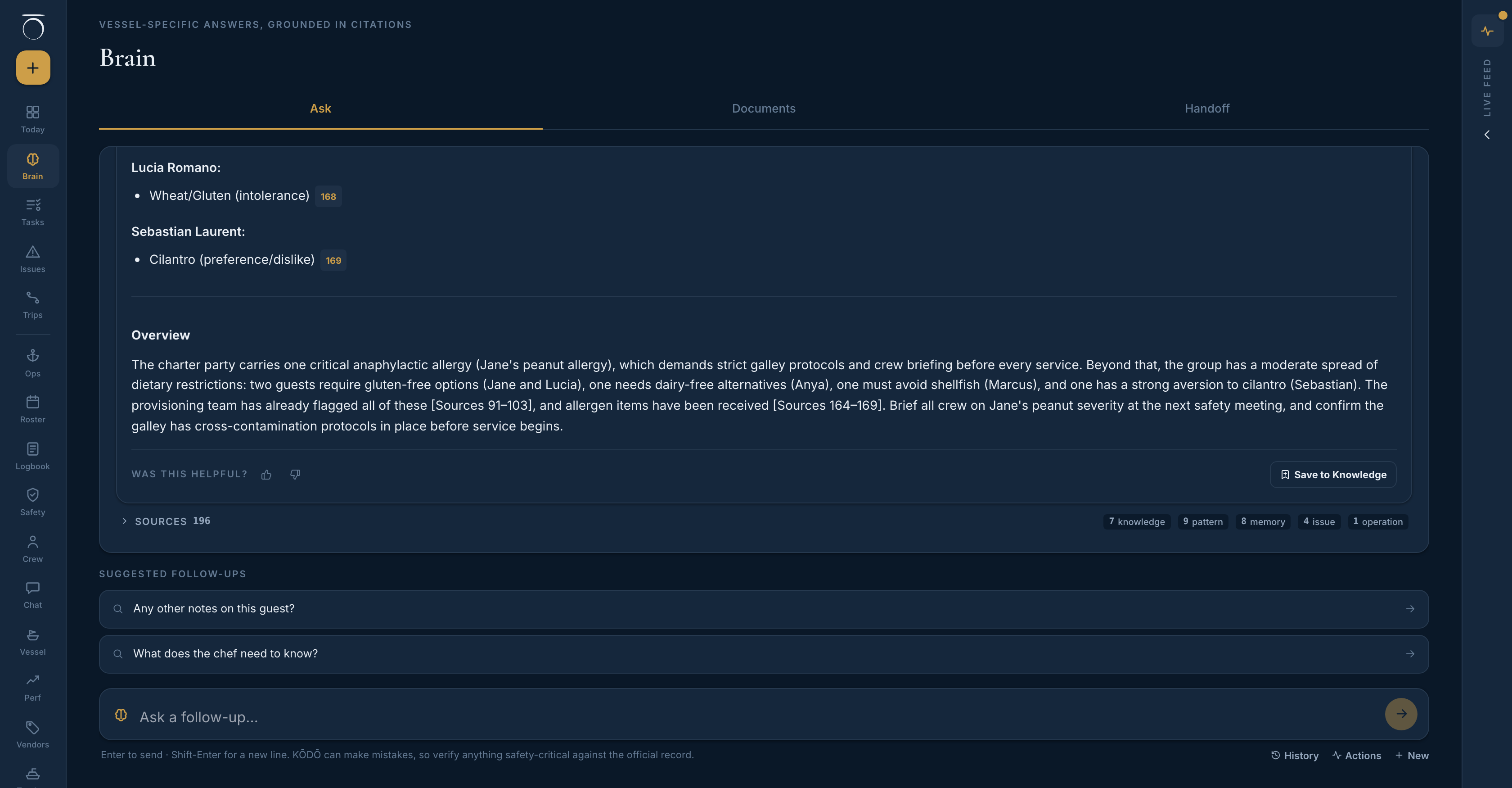
Ask the Brain in plain language and get an answer with cited sources from the vessel's own record. Leadership can generate a role-specific handoff briefing grounded in the boat's current state, and each crew member reads the briefing for their role from their profile.
Ask the boat, not the person who left
The Brain is the vessel's memory. A question is searched across the boat's manuals, its issues and operations, its procedures, vendor records and notes, and the answer comes back in plain English with citations you can open. Hard facts such as a guest allergy or a certificate expiry outrank narrative. A captain-verified note outranks an unconfirmed one. Older material fades in ranking but never disappears.
That matters for a handover because the incoming person does not know what to ask until the problem is in front of them. The engineer who cleared the watermaker in July is on another boat. The record of what he did is still here. Knowledge keeps building: a completed operation can be saved as a procedure, a captain can promote a useful message into the knowledge base, and leadership manage the vessel memory directly.
Who sees what
Roles are captain, officer, head of department, manager, owner and crew. Most crew pages are visible to the whole crew, with leadership actions gated inside the page. The database decides what each role can see, not the screen.
- Issues: vessel-wide roles see every report, a head of department sees their departments, and crew see what they logged themselves
- Tasks: crew default to their department's work; the captain gets a vessel-wide view
- Messages: you only see the channels you belong to
- Crew directory, dossiers, certificate expiry and the training matrix: captain, officer, owner and manager only
- Resolve, corrective action and verified close-out on an issue: captain or officer
- Surveyor share link for the logbook: captain only, read-only, with a hard expiry
- A separate oversight surface: readiness, position, approvals, spend, compliance and charters
- Read-only by design; the captain curates what reaches the owner
- They never see the raw crew feed of tasks and issues
- Identity documents default to private, visible only to the crew member who uploaded them
- Licences default to visible to the captain, so the boat can prove crew are qualified
- Each toggle is the crew member's to set and to reverse
Access, retention and export
Everything the person logged about the vessel. Tasks, issues, logbook entries, machinery readings, operations, vendor notes, messages and knowledge stay in the vessel record. Signed entries are immutable at the database level, so a leaver cannot alter the history on the way out.
Their own record. Profile, certificates, the encrypted travel-document vault, the sea-time record, a captain's playbook and a chef's recipe book belong to the person and follow them to the next boat. Crew can export their personal record at any time.
The captain manages each crew member's status from the crew directory. Temporary crew can be invited with an end date, so their access expires on its own, and can be made permanent if they stay. Owners and managers cannot invite or manage crew.
The record is kept for the life of the account. The vessel history report shows whether the tamper-evident chain is intact, the share of days with logged activity, the share the captain signed off, and the longest silent gap. Gaps are shown, not hidden.
A complete export is one action away, at no charge, in a format you can read without us. The logbook, the statutory books, the incident pack, the SMS audit pack and the vessel history report each export to PDF. There is no hostage clause.
Work that can't wait continues on the device and syncs when the connection returns, and everything from the last sync stays readable. Full offline access to every screen is still being built. We would rather say where that line is than have you find it in a bay with no coverage.
For the method as well as the software, the crew handover guide covers why handovers fail, what a real one contains, and a two-week timeline you can copy whether or not you use KODO. The maintenance workflow shows how the open items above get created and closed.
Asked by captains and managers
Does the outgoing crew member have to write a handover document?
No document is required. The record is built from the work the crew already did: tasks, issues, logbook entries, machinery readings, vendor notes and messages. Leadership can generate a role-specific handoff briefing from the boat's current state, with citations, and a leaver can still add notes to the vessel memory if there is something the record does not say.
What happens to a departing crew member's access and data?
The captain manages each crew member's status from the crew directory, and temporary crew can be invited with an end date so their access expires on its own. Everything the person logged about the boat stays with the boat. Their profile, certificates, travel documents, sea-time record, playbook and recipe book belong to them and leave with them, and they can export their own personal record at any time.
Can we take the whole record with us if we leave KODO?
Yes. A complete export of the vessel's record is one action away, at no charge, in a format you can read without us. The logbook, the statutory books, the incident pack, the SMS audit pack and the vessel history report each export to PDF as well. There is no hostage clause.
See a handover on a live demo vessel
Thirty minutes on M/Y Seafarer, a demonstration vessel. Watch an incoming engineer open the boat on day one, find the open faults, and ask what was done to the watermaker last time.
Book a 30-minute demo